
AI Photo to 3D Model: Turn Any Image Into a 3D Asset in Minutes
Learn how to convert product photos, character references, or everyday objects into downloadable 3D GLB models using AI tools — no 3D software experience needed.
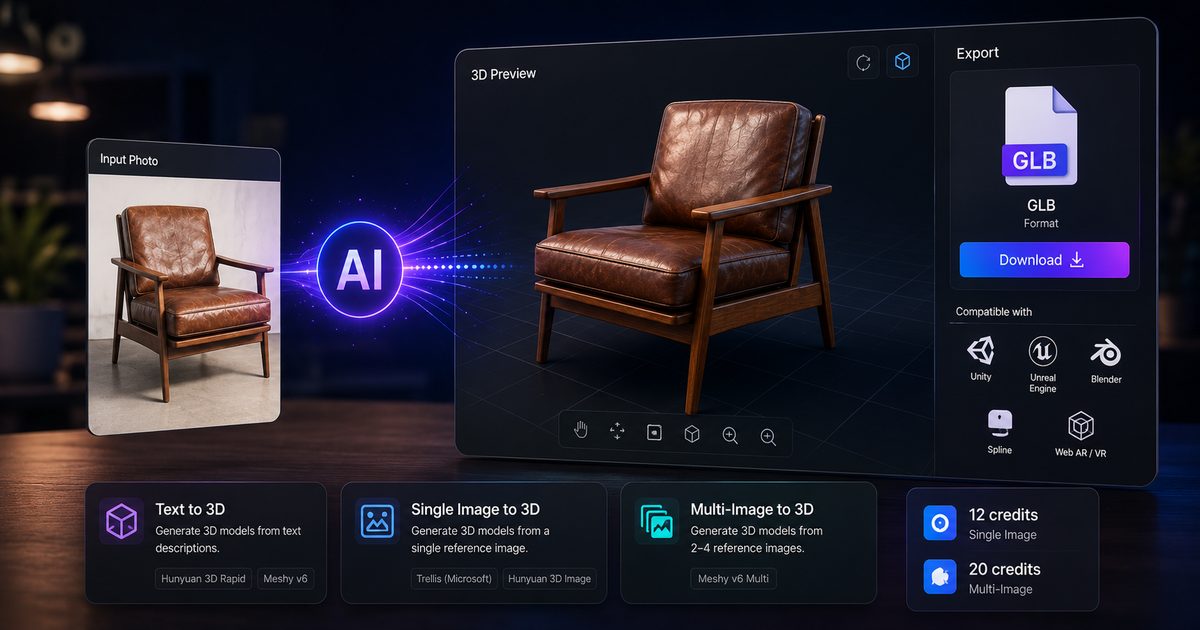
Why AI-generated 3D models are a game-changer
Traditional 3D modelling has a steep skill floor. Learning Blender or Maya to a professional level takes months. Photogrammetry (scanning objects with a camera rig) requires specialised hardware. AI-generated 3D removes both barriers entirely: you upload a photo and receive a textured, downloadable 3D model in under two minutes.
The use cases are expanding fast — product visualisation, game assets, virtual try-on, architectural props, and social AR effects all benefit from cheap, fast 3D generation.
The three AI approaches to 3D generation
1. Text to 3D
Describe an object in words and the model generates geometry from scratch. Best for conceptual or fictional assets where you do not have a reference image. Models: Hunyuan 3D Rapid (fast) and Meshy v6 (higher-detail mesh).
2. Single image to 3D
Upload one reference photo and the model infers the full 3D geometry, including unseen faces. This is the sweet spot for product work — you photograph the front of an object and the AI reconstructs the rest.
Two models are available on Arcframe for this mode:
- Trellis (Microsoft) — exceptional at hard-surface objects: electronics, furniture, packaged goods. Produces clean, manifold meshes.
- Hunyuan 3D Image (Tencent) — stronger on organic shapes: plants, food, clothing, characters.
3. Multi-image to 3D
Upload 2–4 photos of the same object from different angles. The model combines the perspectives for a far more accurate reconstruction than a single image allows. Use Meshy v6 Multi for this. Recommended workflow: photograph the object from front, back, left side, and top-down — then upload all four.
Tips for the best results
- Clean background: A plain white or grey background dramatically improves segmentation. If your photo has a cluttered background, use Arcframe's Remove Background tool first (Image → Remove BG).
- Even lighting: Avoid harsh shadows — they confuse the model into treating shadows as geometry.
- Single subject: Crop tightly to the object. The models perform best when the subject fills most of the frame.
- Sharp focus: Blurred images produce blurred meshes. Use the sharpest photo you have.
What you get
Arcframe delivers the output as a GLB file — the standard binary glTF format that works natively in Unity, Unreal Engine, Blender, Spline, and all major AR/VR platforms. You can preview it interactively in the browser before downloading, rotating and zooming to inspect every face.
Credit cost
Single-image models (Trellis, Hunyuan 3D Image) cost 12 credits per generation. Multi-image Meshy costs 20 credits. At the Pro tier you get 600 credits per month, which covers 30–50 complete 3D models — more than enough for a serious product catalogue sprint.