
Arcframe Now Translates Your Scripts for Indian Language AI Speech
The new Translate Prompt button converts your English script into any of 11 Indian languages before sending it to Sarvam AI — producing more natural, accent-accurate speech output.
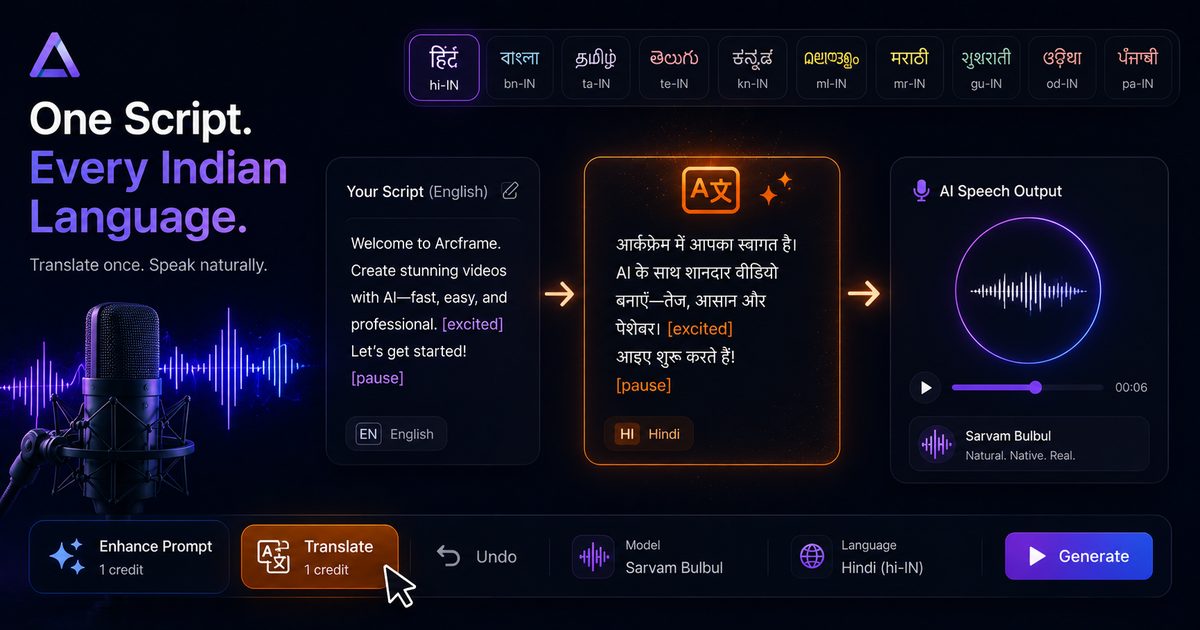
Why Your Prompt Language Matters for AI Speech
When you generate speech in Hindi, Tamil, Bengali, or any Indian language on Arcframe using Sarvam AI, the model processes your input text directly. If that input is written in English — even phonetically — the output carries a different rhythm, intonation, and accent than native-language text would produce.
The reason is simple: Sarvam Bulbul was trained on native-language text. Feeding it a Hindi script written in Hindi produces dramatically better prosody and naturalness than feeding it an English approximation.
The new Translate Prompt button on Arcframe solves this without requiring you to write in the target language yourself.
What Translate Prompt Does
When you select Sarvam Bulbul as your speech model and choose any language other than English (en-IN), an orange Translate button appears in the dashboard toolbar beside the Enhance Prompt button.
Clicking it sends your script through an AI translation layer that:
- Translates your text into the selected target language.
- Preserves inline delivery cues like
[whispers],[excited],[pause], and[slow]— these are passed through unchanged so your vocal direction survives the translation. - Replaces the text in the prompt box with the translated version.
You then hit Generate and Sarvam Bulbul receives fully native-language text — producing the most natural output possible.
Supported Languages
Translate Prompt works for all 10 non-English languages available in the Sarvam Bulbul language picker:
- Hindi (hi-IN)
- Bengali (bn-IN)
- Tamil (ta-IN)
- Telugu (te-IN)
- Kannada (kn-IN)
- Malayalam (ml-IN)
- Marathi (mr-IN)
- Gujarati (gu-IN)
- Odia (od-IN)
- Punjabi (pa-IN)
English (en-IN) does not require translation — selecting it with your original English script already gives Sarvam Bulbul its best input.
Credit Cost
Translate Prompt costs 1 credit per use for all 10 non-English languages. English (en-IN) is always free — selecting English returns your original text without any AI call or credit deduction.
The subsequent speech generation costs 2 credits using Sarvam Bulbul. So a full translate-then-generate workflow for a non-English language costs 3 credits total — a small price for a significantly more natural result.
Who This Is For
- Content creators producing voiceovers for regional YouTube channels, Instagram Reels, or Facebook videos.
- Marketers localising ad scripts for Hindi, Tamil, Telugu, or Bengali audiences without hiring a translator or native-language copywriter.
- Educators creating explainer videos in multiple Indian languages from a single English master script.
- App developers generating audio content for multilingual Indian user bases.
How to Use It — Quick Start
- Go to the Arcframe dashboard → select Audio → Speech.
- Select Sarvam Bulbul as your model.
- Choose your target language from the language pill strip (e.g. Hindi).
- Type your script in English in the prompt box.
- Click the orange Translate button in the toolbar.
- Your script is now in the target language. Review it, then click Generate.
That's three extra seconds of effort for a meaningfully better Indian language voiceover.